
Documentation
Designing Studies
How to design your participant journey — from surveys and randomization to branching and AI tasks.
What is a Study?
A study in Gricea is a structured research procedure that guides participants through a sequence of stages. Each study is represented as a flow graph — a directed graph where nodes represent participant-facing stages (surveys, instructions, AI tasks) or logic steps (branching, randomization, variable assignment), and edges define progression.
Studies follow a draft → publish lifecycle:
- Draft: You iterate on the design in the visual builder. Drafts are editable and can be previewed.
- Published: When ready, you publish an immutable version. Publishing creates a stable snapshot — the draft remains editable for future iterations, but published versions are fixed for participants.
- Stopped: Published studies can be stopped to prevent new participants from joining.
Each study has a lineage ID shared across versions, so you can track the evolution of a study design over time.
Experimental Design Components
Gricea supports standard experimental design patterns used in HCI and behavioral research:
Between-Subject Design — Different participants experience different conditions. Use the Randomize node to randomly assign participants to conditions. For example, half your participants might interact with a biased AI and half with a neutral AI.
Within-Subject Design — Every participant experiences all conditions (in randomized order). Use the Within Subject Start and Within Subject End nodes to create blocks where participants cycle through all conditions. Counterbalancing is built in.
Independent Variables (IVs) — The factors you manipulate. In Gricea, these are configured through randomization (between-subject) or within-subject blocks. IVs might include: system prompt variations, RAG retrieval strategies, interface layouts, or bias modes.
Dependent Variables (DVs) — The outcomes you measure. These are captured through survey responses, behavioral signals (message count, time on task), and interaction logs (what the AI showed, what the user did).
Control vs. Treatment — Branch nodes let you route participants to different task configurations based on their assigned condition, creating clean comparisons between experimental groups.
How to Study Conversational AI
Modern conversational agents are best understood as pipelines — a typical system couples an interaction interface (chat, search UI) with a backend runtime that maintains dialogue state, optionally grounds responses in external evidence, and orchestrates tool use.
This framing is important for research because many interventions and confounds occur outside the model itself: how context is constructed, what evidence is retrieved, what is shown to the user, and how the user can steer or verify the system.
The manipulation space for conversational AI studies spans several layers:
Interface-level manipulations:
- Layout & workspace: single chat vs. multi-panel layouts
- Information presentation: whether sources/citations are shown, and how
- Interaction scaffolds: progress guides, checklists, stage prompts, reminders
- Interaction modality: text-only vs. multimodal inputs/outputs
Agent-level manipulations:
- Context & grounding: which context is retrieved, retrieval filters, how evidence is injected
- System instructions: role/persona framing, safety style, optimization targets
- Model & decoding: model choice, temperature, verbosity constraints, guardrails
- Tools & actions: which tools exist and what policy governs tool use
- Turn behavior: initiative strategies, clarification thresholds, multi-turn control loops
Gricea makes each of these manipulations a configurable parameter rather than requiring you to build a custom prototype for each condition.
Recommended Reading
These papers explore research questions that Gricea is designed to support. They illustrate the kinds of studies you can build on the platform:
- Sharma et al. (CHI 2024) — Investigated how LLM-powered search may create echo chambers by limiting exposure to diverse viewpoints. Gricea supports this type of study through bias-aware retrieval and consonant/dissonant conditions.
- Sharma et al. (CHI 2026) — Studied how interface scaffolds change user feedback patterns towards AI systems. Gricea supports this through configurable UI components and scaffolded chat tasks.
- Shi et al. (2025) — Examined how users perceive and respond to dark patterns in LLMs. Gricea supports studying prompt manipulation effects on user behavior.
- Kim et al. (FAccT 2024) — Explored how uncertainty expressions in LLM responses impact user reliance and trust. Gricea supports this through system prompt manipulation and survey-based trust measures.
- Maurice-Jakob et al. (CHI 2023) — Showed that opinionated AI co-writers can shift user opinions during collaborative writing. Gricea supports studying opinion change through pre/post surveys and biased AI conditions.
- Jain et al. (2025) — Investigated how interaction context shapes sycophancy in LLMs. Gricea supports studying conversational dynamics through turn-level logging and condition manipulation.
- Jelson et al. (2024) — Studied how students use ChatGPT for essay writing. Gricea supports education-focused AI interaction studies with detailed behavioral logging.
Configuring Studies: Node Types
The study builder provides a visual canvas where you drag and drop nodes to design your participant journey. Each node type serves a specific purpose. Here are all the study-level nodes available:
study:survey
Survey
Presents a full-screen survey to collect participant data. Supports 10 question types: Likert scales, text input, multiple choice, sliders, checkboxes, textareas, instruction blocks, matrix questions, voice recording, and file upload.
Key Configuration
study:instructions
Interaction
Displays instructions or information to the participant using rich markdown. Supports variable interpolation with {{variableName}} syntax.
Key Configuration
study:annotation
Survey
Split-screen annotation task with stimulus on the left and questions on the right. Supports item pooling, shuffle, and bulk JSON upload for multiple items.
Key Configuration
study:branch
Flow Control
Routes participants to different paths based on variable conditions. Each branch checks a condition and routes to a target node. A default path handles unmatched cases.
Key Configuration
study:randomize
Flow Control
Randomly assigns participants to experimental conditions (between-subject design). Supports weighted randomization. Sets variables that can be used by downstream branch nodes.
Key Configuration
study:within-subject-start
Flow Control
Marks the beginning of a within-subject block where each participant experiences ALL conditions. Supports counterbalancing (randomized order).
Key Configuration
study:within-subject-end
Flow Control
Marks the end of a within-subject block. Automatically loops back to the start node until all conditions have been experienced.
Key Configuration
study:logic
Data & Variables
Runs logic functions to transform, compute, or derive new variables. Supports constant values, variable references, function calls, and inline expressions.
Key Configuration
study:set-variable
Data & Variables
Sets or computes study-level variables. Supports constants, copying from other variables, expression evaluation, and random selection from weighted options.
Key Configuration
study:task
Interaction
Embeds an interactive AI-powered task within the study. Supports chat, web search, scaffolded chat, and split-view task types. Each task has its own node-based flow graph for fine-grained control over the interaction.
Key Configuration
Task UI Elements
When configuring a task embedded in a study, you define its UI layout and components. The available UI component types are:
- Chat — Full conversational chat interface with message history, streaming responses, source references, and file upload.
- InlineSurvey — A survey form that appears within the task interface (can be shown inline or as a modal).
- InstructionsSidebar — A side panel displaying instructions or contextual information alongside the task.
- Notepad — A freeform text editor for participants to take notes during the task.
- SourcePanel — A panel displaying retrieved sources/references from RAG collections.
- SearchInterface — A web-search-style interface for information retrieval tasks.
- ArticleViewer — A reader for viewing long-form articles or documents.
These components can be arranged in different layouts:
single— One component fills the screensplit— Two components side by sidesidebar-main— Small sidebar + large main areatwo-column— Two equal columnsgrid— Grid arrangement for multiple components
Complete Study Workflow Example
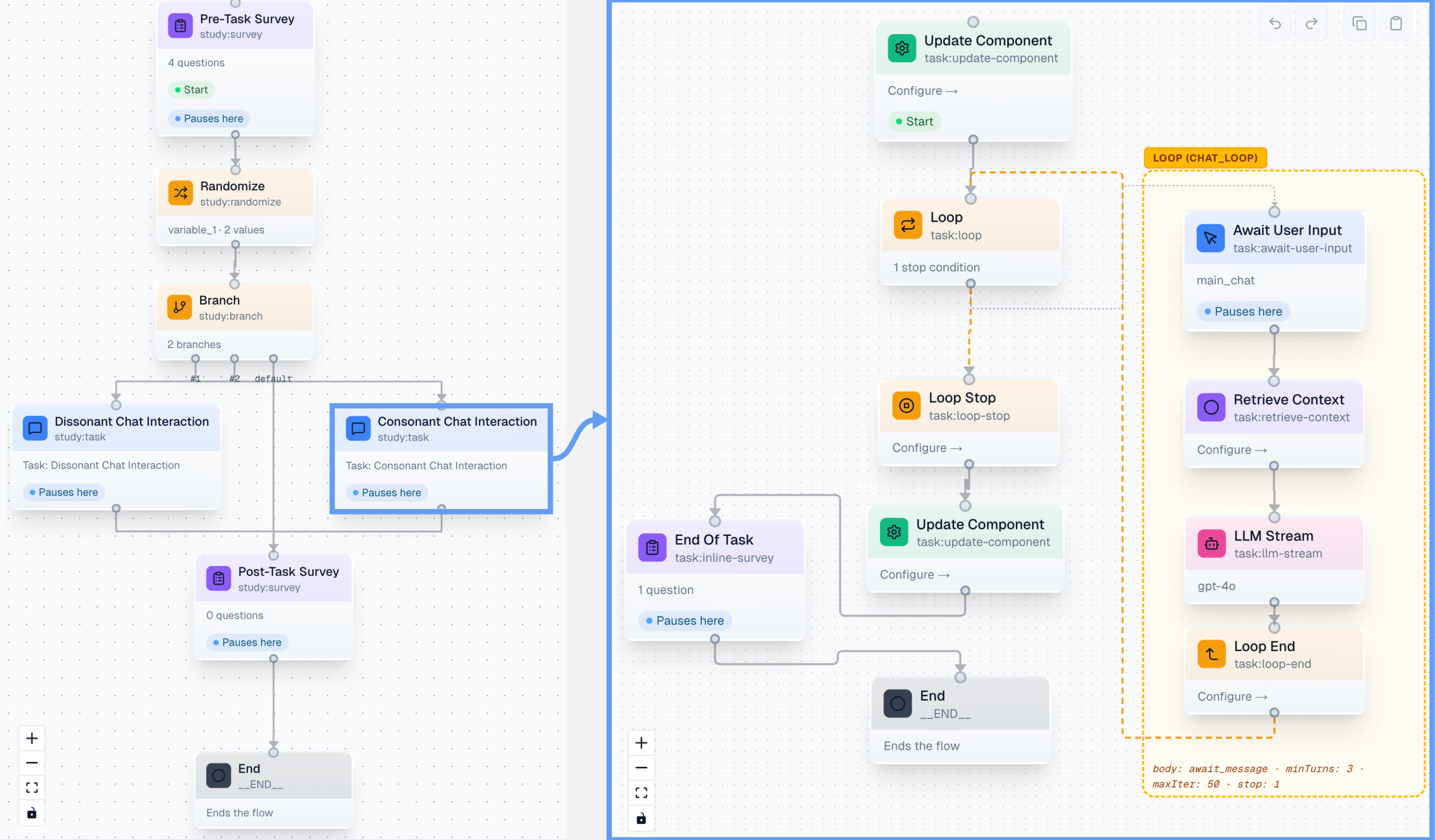
Here is a complete example of a study investigating how biased AI retrieval affects user opinions. This study uses between-subject design with two conditions:
Study Flow:
- Pre-Task Survey — Collect demographics and initial stance on a topic
- Randomize — Randomly assign to "consonant" or "dissonant" condition
- Branch — Route to the appropriate chat task based on condition
- Chat Task (Consonant) — AI retrieves evidence aligned with user's stance
- Chat Task (Dissonant) — AI retrieves evidence opposing user's stance
- Post-Task Survey — Measure opinion change, trust, and experience
This workflow allows you to study whether the framing of retrieved evidence (consonant vs. dissonant) causally affects opinion change, while holding all other aspects of the interaction constant.
study:survey (demographics)
  → study:randomize (assign condition)
  → study:branch (check condition)
    → study:task (consonant chat)  ─┐
    → study:task (dissonant chat)  ─┤
  → study:survey (post-task)       ←┘
  → End
Example: Between-Subject Study Flow